Send a payment link
Ask for a deposit, the balance or the full amount right in the conversation. The traveller pays on your own payment page, so the money goes straight to you. Fareply never touches the money or card details.
Before you start
- A payment page that takes money for your agency: a PayPal link, your bank's or card provider's payment page, or
any page that starts with
https://. - Optional (owners): save it once in Agency profile, under Payment page. The inbox then fills it in every time.
Send it
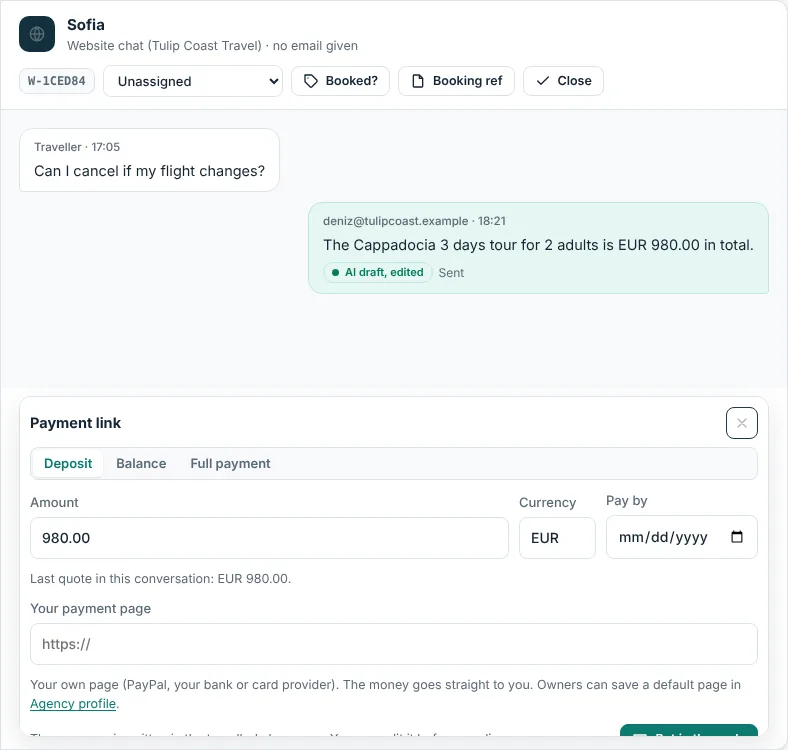
- In the Inbox, open the conversation and click Payment under the reply box.
- Choose Deposit, Balance or Full payment. Enter the amount and currency. If you quoted a price in this conversation, Use it fills in that total.
- Check the payment page address. Add a Pay by date if you like.
- Click Put in the reply. The message appears in the reply box in the traveller's language, with the booking reference when there is one. Edit it if you like, keep the link in it, and click Send.
Mark it paid
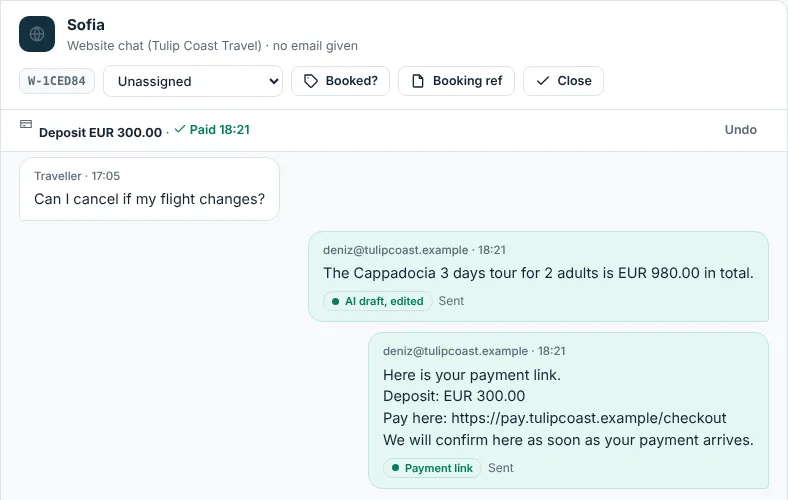
The link appears in a bar at the top of the conversation. When the money arrives, click Mark paid. Click Cancel if you no longer ask for it, and Undo to change your mind. Reports shows how many links you sent, what you asked for and what was paid.
Good to know
- Messages are written in 11 languages, with the traveller's number style (for example
EUR 1.580,00in Turkish). - A payment message does not count as a new quote in Reports.
- WhatsApp and Messenger allow normal messages only within 24 hours of the traveller's last message. After that, wait until they write again, or send an approved WhatsApp template.
- Fareply does not check whether the payment arrived: mark it paid after you see it in your account.