Send a quote as a page
Every quote you make can also be sent as a link. The traveller opens it on their phone, sees your branded quote in their language, accepts it with one tap and pays on your payment page. It works on every channel, including Instagram, Messenger, WeChat, Telegram and LINE, where a PDF cannot be sent from Fareply.
Send it
- Make the quote as usual: Quote PDF under the reply box, or Make quote PDF on a drafted price.
- Click Send link. The traveller gets a short message in the quote's language with the address of the page.
- Or click Copy link and paste it anywhere: an email, your own WhatsApp, a text message.
What the traveller can do
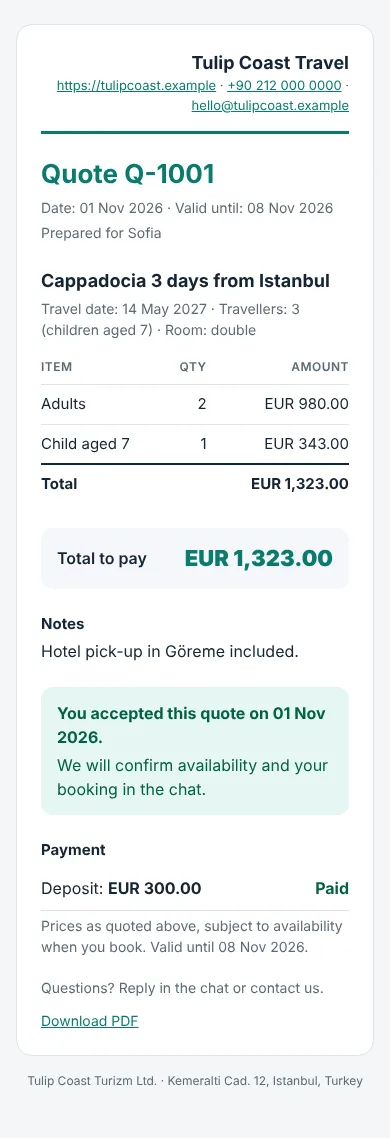
- Accept this quote. Your team gets a note in the conversation, and the conversation moves to the top of the inbox. Accepting is not a booking: you confirm availability and book as usual. The page says so.
- Pay. The page shows the payment links you sent in that conversation, and which are paid. Without one, it shows your payment page from Agency profile.
- Download the PDF.
After the valid-until date the page says the quote has expired and can no longer be accepted.
See what happened
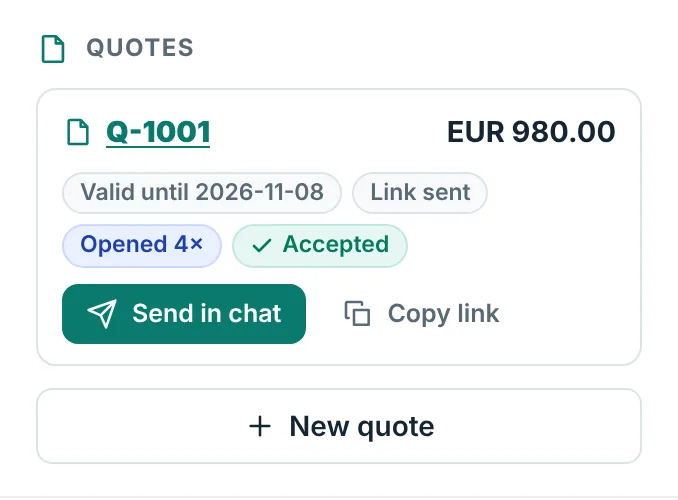
In Quote PDF, each quote shows whether the link was sent, how often it was opened and whether it was accepted. Previews that WhatsApp or Telegram make of a link are not counted as opened.
Good to know
- Only someone with the link can open the page. It is not shown in search engines.
- The page shows your logo, colour, contact details and the legal details from Agency profile.
- Quote pages are part of the Pro, Agency and DMC plans, like quote PDFs.