After the booking: itineraries and the trip page
Once a booking is confirmed, the questions change: what time is the pickup, which hotel tonight, what is included tomorrow, who is our guide. Write the itinerary once in Fareply. The traveller gets it as a trip page on their phone, and Fareply answers those questions from it in the chat, in the traveller's language. Your team can spend its time on the trip itself.
1. Write, upload or link the itinerary
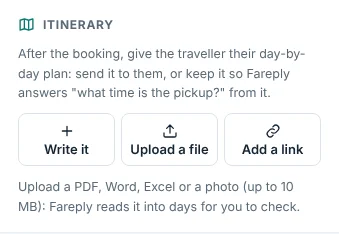
In Lead details, under Itinerary, choose how to start:
- Write it: the day-by-day form below.
- Upload a file: the itinerary you already have, as a PDF, Word (.docx), Excel (.xlsx) or a photo (PNG or JPG), up to 10 MB. Fareply reads it into the same day-by-day form, with each day shown next to the text it came from. Check the days, fix anything, and approve.
- Add a link: a link to your own itinerary (your website, a shared document). The traveller gets your link. Fareply never opens it, so the AI answers questions only from days written or read into Fareply.
Write it
- Open the conversation and, in Lead details, find Itinerary. When the conversation is booked, the section is highlighted.
- Click Write the itinerary. Fareply fills in the tour, the first day and the travellers from the quote.
- For each day, write a title and the plan, with times and pickup points ("07:30 pickup from your hotel lobby"), the hotel for the night, the meals included and what is not included. Add or remove days as needed: the dates follow the first day.
- Add contacts (guide, driver, an emergency number), the meeting point, what to bring and anything good to know.
- Click Save and approve, or Save draft to finish later.

Nothing is used before it is approved. An owner, or the teammate the conversation is assigned to, approves it. Every later change is saved as a draft and used only after it is approved again, as a new version.
2. Choose what happens after the booking

- Send to traveller: click the send button. The traveller always gets one link, in the itinerary's
language:
- on Pro, Agency and DMC plans: the trip page, with the PDF to download on it;
- on Starter: the itinerary as a PDF;
- with only your own link: your link.
- Answers only: nothing is sent. Fareply still answers the traveller's questions from the itinerary.
- New link: if a link reached the wrong person, make a new one. The old link stops working at once.
The default for new itineraries is under Automatic replies, After the booking. Each conversation can change it.

Uploaded files: what is safe and what the traveller gets
- Fareply checks what a file really is, not just its name. Files with macros (.docm, .xlsm) are refused. Where the server has virus scanning, every file is scanned before it is accepted.
- The traveller only ever gets a PDF. An uploaded PDF is rebuilt without scripts, attachments, form actions and hidden data such as the author's name. For Word, Excel and photos, the traveller gets a PDF that Fareply makes from the approved itinerary, in your branding.
- If the file contains prices, or words such as "net", "cost" or "commission", Fareply warns you before anything is shared. Make sure the traveller does not see your costs.
- The original file is deleted once it is read. The PDF is deleted 90 days after the trip.
The trip page

- Your logo and colour, the trip day by day, and Today highlighted during the trip.
- Contacts with Call and WhatsApp buttons, the meeting point, what to bring, good to know.
- The booking reference, and payments: what is paid and what is still due, with the pay button.
- Share with family: the traveller can send the page on, and it always shows the latest approved version.
- No sign-in and no app. The address is long and random, and search engines do not list it.
- It ends 30 days after the last day of the trip. After that it shows only a thank-you and your contact.
- Lead details shows when it was sent and how often it was opened.
3. Fareply answers from the itinerary
When the traveller asks "what time is the pickup on day 2?" or "which hotel are we in tonight?", the reply desk answers from the approved itinerary of that booking, with the same rules as answers from your policies:
- Every answer cites the day it comes from, shown under Why in the inbox.
- Every time, date and phone number in the answer must be written in the itinerary. If not, a person answers.
- Only that booking's itinerary is used, never another traveller's.
- Changes ("can we start later?", "another hotel?") always go to your team.
These answers are their own reply type, Itinerary answers, under Automatic replies. They start as suggestions your team sends. When the team rarely changes them, an owner can make them automatic.
When the booking changes
- On request: prepare the itinerary, and send it once the booking is confirmed.
- Cancelled, or the lead marked lost: the AI stops answering from the itinerary, nothing can be sent, and the trip page and PDF link show that the trip was cancelled, with your contact. Nothing is deleted: if the booking is reinstated, everything works again.
Good to know
- Write the itinerary in the language you work in. Fareply answers questions in the traveller's language. The trip page's buttons and headings follow the page language you choose.
- Changing the itinerary does not send anything by itself. Approve the change; the trip page shows it at once. Tell the traveller in the chat if it matters ("Day 3: the pickup is now at 05:00").
- Deleting an itinerary stops the trip page link.